Summary
A direct deposit is a secure electronic transfer of funds deposited directly into your bank account. Direct deposit replaces the need to receive payments by paper cheque.
Some examples of what you can set up as a direct deposit:
- Payroll (if direct deposit is supported by your employer)
- Income tax refund
- If eligible, government payments like the Canada Child Benefit (CCB), GST/HST credit, Canada Workers Benefit (CCB) and the Canada Emergency Response Benefit (CERB)
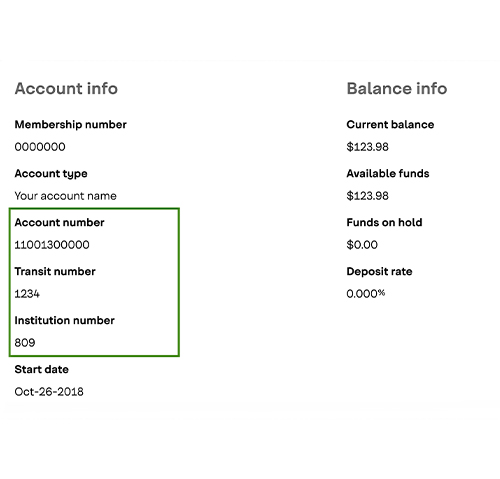
View your transit number, institution (bank) number and account number
How to do it
- Sign in to digital banking
- From the “Account Overview” screen, select the account you want this information for
- Select the Details tab
You can find these numbers in the order they're listed below:
Account number
Your account number is 11 or 12 digits long excluding the three numbers in the brackets and located either next to or directly below your account name.
Transit number
Your transit number is 5 digits long.
Institution number
The Institution number is 809.
Download a digital void cheque
When setting up a pre-authorized debit (like a bill payment) or credit (like payroll), you may be asked to provide a void cheque. You can view and download a void cheque using digital banking.
How to do it
- Sign in to digital banking through a computer or our mobile app
- From the menu, select Account Overview, then Void Cheques
- Select the account you want the Void Cheque for and confirm your address is correct
- Select the Export Void Cheque button to download a PDF file containing your void cheque
- You can save or print this PDF to provide a digital or physical copy
Ready to go?
Sign in through this button to go directly to the Download Void Cheque page.
Enrol for CRA direct deposit
CRA direct deposit is a secure and convenient way to receive your CRA benefits, like your income tax refund, GST/HST credits and more.
How to do it
- Sign in to digital banking through a web browser (this feature is not available on the app)
- From the menu, select Products & Services, then Enrol for CRA Direct Deposit
- Select the account you want the direct deposit to go into
- Select Continue and follow the steps
Ready to go?
Sign in through this button to go directly to the Enrol for CRA Direct Deposit page.